More

Pages

Wednesday, 30 January 2013

Installation Of Window XP Service Pack 2

XP Installation
XP Installation

Firs Of All It is necessary to know that what is Boot ?

When you start your computer you computer take date from any resource like CD/DVD Room, Hard Disk, or Removable Devise ,This is known as System Boot.

Boot Setting:

Your Boot setting must be as Under if you window from CD 
  1. CD/DVD Room 
  2. Hard Disk                                  (Not Important For Window)
  3. Disable                                       (Not Important For Window)
Your First Bot Setting is compulsory 2nd and 3rd are not compulsory For Window. But After The Window 2nd Boot Setting is Help our Computer to read Data From Hard Disk.

When Window Start?

when your Computer Screen Appear "Press any Key Boot From CD.........." and you Press Any Button of Key Board than window is start
This screen Look Like this:
Press Any Key
Press Any Key

After Window Start:

Do not do any thing after the press any key. System will automatic check your system file
the following screen will be appear in your computer But you do not press any key.
Window Start
Window Start
Don't Press Any Key
Don't Press Any Key
Setup is being Starting

After Some Time Press Enter

when the screen who appear as under when you see this screen than press Enter Button from your keyboard
Press Enter For Continue Installation

Read Agreement and Press F8

After Press Enter Key, Agreement Page are appear in your screen When you see this agreement then press F8 key to agree this agreement
Press F8 for Accepting Agreement
Press F8 for Accepting Agreement  

Window Repair Screen Appear 

After Press F8 window repair appear 
  • If you want to repair old window than press Enter
  • If You want to New Window Install then Press Esc key.(New window is better)

Partition screen Appear

If you want to new window xp than it is necessary to Delete old window
  • Use Arrow key to move your bar 
    • keep you bar on {"C"} or {that partition where old window install}
    • Press D for (Delete) 
    • Then Press Enter For Agree 
    • And Last Press L for again Agree
  • Now your Partition Deleted and Drive C remove
where you Delete Partition delete his name will be remove if you want to new window on this drive than keep you bar on that drive and press Enter 

Format Screen Appear 

Now Four Format option are appear on your screen 
Keep You bar on any format option whichever you want 
I suggest you to keep your format bar on first it is Good and Fast
Format Option
Format Option

Format Start Screen Appear

After Select any Format Than format will be start now your work is end and your Window CD work is start, You Cant do any thing with your Mouse Or Key-Board
How to Format
Format of Disk Start

Copy Screen Appear

After Format Some file copy to your hard disk but you don't do any work on computer.
Copping Some File From Window CD
Copy File in End Position

Restart Screen Appear 

when Restart Screen Appear in you your Screen time will start from 15 seconds if you press  Enter then he quick restart other wise it will be restart after 15 seconds.
Restarting Computer
Restarting Computer

Installation Window 

After Restart computer will automatically start window installation and 39 minutes will start at your screen you can't do any work with your keyboard and mouse
After Restarting Computer Screen

Installation Devices Screen

Language Setting Page

Click on Customize
Click on Customize
Click on Language Tab and Tick on Box

Warning Page Appear click ok
Warning Page Appear click ok

Click Apply for next Screen

Wait For Some time and click on Next

Name option
Enter Your Name and Click on Next

XP KEY
Enter CD key which is written back side of your CD

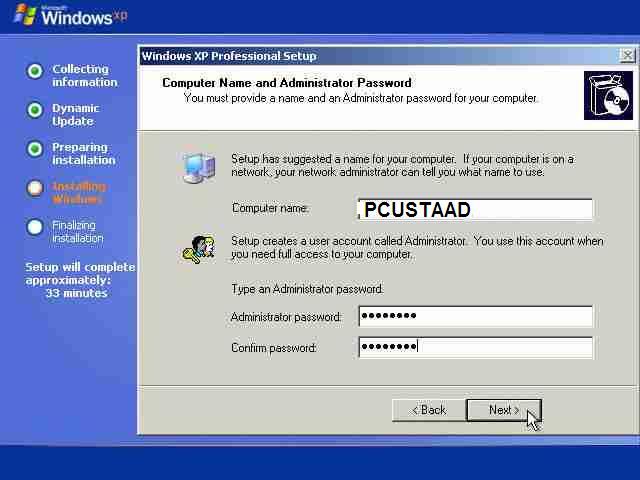
Chose Computer and set password
Chose Computer and set password 

Set Time and Click for continue

After some setting again installing file is start

Modem Setting
In Old PC modem setting also Appear Click next for Continue

Copping File of Operating Software

Finishing Installation

Click OK for Continue

User Account Setting
Click ok for Further User Account Setting

Window XP Logo

Welcome and Help Screen Appear

No Need this Setting for now a day. So, Skip this.

Click Next


Now All Will Be done Enjoy


Live Geo Entertainment TV Channel

Geo Entertainment
Geo Entertainment

Geo Entertainment Very Interesting Channel that provides us Very Beautiful Drama of Pakistani Networks, This Channel Owner is Indian but this work in Pakistani Network.

Tuesday, 29 January 2013

90+ Isreali Sites Hacked & Defaced By 3xRooT, Turkish Cyber Army to Protest Against Israel

Mass Attack by Turkish hacker 3xRooT from Turkish Cyber Army hack More then 90 Israeli sites and Message Delivered.
Since the day announcement by Israel that they are planning to fully destroy Palestine, hackers around the world have gone into a full on rage against the Zionist state of Israel. I would say we never see that kind of unity ever before in Muslim hackers. 


Hitcher and CapoO_TunisiAnoO are also those Muslims hackers who mostly target Israeli Cyber Space.
One thing is for certain is that Israel may be regretting making threats of furthering the suppression on the people of Palestine. Threatening to deny Palestinians their basic rights to live, denying them any form of communication with the world by making threats to turn off the internet in Palestine has awoken the sleeping beast within hackers.

Deface Page Say's:

"[ Hacked by3xRooT Turkey Forces ]
The united states and Israel rabies, the dog.'s worth of power to kill the Muslims, the devil you aide forgot to laugh in your face innocent people, have forgotten to live, kids seizure of weapons in the hands went to school. sonunuzu Will you own one day play in the game. they no longer despaired of us, they put out flags için.bizde lives for our brothers, we are. Palestine will do everything we're with them ....!

free Turkey & palestina

HACKED By3xRooT
www.k0-ka.in"

Hacked Sites List:

http://972music.co.il/index.html
http://http://aafaq.co.il/
http://adamartdesign.com/
http://adkya.co.il/
http://air4me.co.il/index.html
http://ajdriving.com/index.html
http://admin.amitisraeli.co.il/index.php
http://amitisraeli.co.il/index.php
http://singlass.co.il/index.html
http://art-jachinhirsch.com/index.html
http://art-sionashimshi.com/index.html
http://mazayov.co.il/index.php
http://aviofer.com/index.html
http://bath-4u.com/index.php
http://bbshalom.co.il/index.php
http://beautynart.com/index.html
http://beautynart.com/index.php
http://bit-hr.com/
http://bkivity.com/index.php
http://car-fitting.com/index.html
http://carpenter-4u.info/index.php
http://creativitys.co.il/index.php
http://dextline.com/index.php
http://dj-4me.com/index.php
http://dj-4me.info/index.html
http://yogev-yechiely.org/index.php
http://kosher-kravi.com/index.php
http://drorpinto.com/index.php
http://win12.edomain.co.il/index.html
http://http://ershad.co.il/index.php
http://figuralifestyle.com/index.php
http://geriumltd.com/index.html
http://tuffiaslaw.co.il/index.php
http://gutzeit.co.il/index.html
http://gysv.co.il/index.html
http://aqualines.co.il/index.html
http://heblearn.com/index.php
http://homeopathic.com/
http://theglobaleducation.com/index.php
http://ibravo.co.il/
http://ishaiwilson.com/index.php
http://kazdan.net/index.php
http://alon.kazdan.net/index.php
http://kehilatmarpe.com
http://theglobaleducation.com/index.php
http://dar5.com/index.php
http://t3j8.dar5.com/index.php
http://ymy.dar5.com/index.php
http://lasersigns.co.il/index.php
http://fainarom.com/index.php
http://mayalugassi.com/index.php
http://michalbartov.co.il/index.php
http://medialogic.co.il/index.php
http://meytalbeauty.co.il/
http://dev.meytalbeauty.co.il/
http://jigsawpuzzlegame.meytalbeauty.co.il/
http://puzzle.meytalbeauty.co.il/
http://shop.meytalbeauty.co.il/
http://meytarim.co.il/index.htm
http://multisophya.theglobaleducation.com/index.php
http://my-invoice.info/index.php
http://mzm.co.il/index.php
http://nails-tlv.co.il/index.php
http://nedalcomputer.net/index.php
http://niliglick.co.il/index.php
http://nrgron.co.il/index.php
http://o-spa.co.il/index.php
http://ottobar.co.il/index.html
http://parts-trade.com/index.php
http://pinecone.co.il/index.php
http://quickcoffee.co.il/index.php
http://tombartov.com/index.php
http://rainbowmusic.co.il/index.html
http://http://ramamen.co.il/index.html
http://rs-consultation.com/index.php
http://galnadlan.co.il/index.php
http://shafriry.com/index.php
http://shifer.co.il/index.php
http://zilpashlomo.com/index.php
http://spiritualmatter.theglobaleducation.com/index.html
http://superdaniel.co.il/index.php
http://tanuga.co.il/index.php
http://tapuzika.co.il/index.php
http://taxi2me.co.il/index.php
http://theglobaleducation.net/index.php
http://shanytires.com/index.php
http://trigonads.com/index.html
http://vfm.co.il/index.php
http://webonmob.com/index.php
http://sdesign.co.il/index.php
http://yamcor.co.il/index.php
http://exdron.co.il/index.php
http://yfx-trading.info/index.php
http://ys-interactive.com/index.php

Mirrors:

http://zone-h.org/archive/ip=62.90.227.176

Monday, 28 January 2013

Google.sh, live.dk, bing.co.ug, msn.sh, Facebook.ug Hacked By ZombiE_KsA & Agd_Scorp , PakBugs

Google.sh, live.dk, bing.co.ug & Facebook.ug Hacked By ZombiE_KsA form PakBugs, Pakistani Hackers and Agd_Scorp from Türk Güvenligi.  PakBugs came back after long time and came up with huge Hack. Google.sh, live, Microsoft, Apple, and many more high profiles rank sites hacked By Agd_Scorp & ZombiE_KsA.


It is quit interesting news that Pakbugs is back almost about 2 years. But same time quit shocking.

Deface Page Say's:
"we are: ZombiE_KsA - Agd_Scorp - Z3r0Byt3

Controlling the game...once again...


We fight...
For our existence.
We don't claim to be perfect.
But we have freedom.
We try to reach our dreams.
Alone with no resistance.
Agd_Scorp & ZombiE_KsA - controlling the scene since 2007"

Hacked Sites & Mirrors:

http://google.sh
http://www.zone-h.org/mirror/id/19141815

http://bing.co.ug
http://www.zone-h.org/mirror/id/19035506

http://facebook.ug
http://www.zone-h.org/mirror/id/19035579

http://msn.sh
http://www.zone-h.org/mirror/id/19142035

http://www.microsoft.sh
http://www.zone-h.org/mirror/id/19142045

http://play.google.sh
http://www.zone-h.org/mirror/id/19141881

http://www.ftp.sh
http://www.zone-h.org/mirror/id/19142073

http://www.apple.sh
http://www.zone-h.org/mirror/id/19142064

http://hsbc.sh
http://www.zone-h.org/mirror/id/19142061

http://honda.sh
http://www.zone-h.org/mirror/id/19142052

http://msn.co.ug
http://www.zone-h.org/mirror/id/19034606

http://radioonlinecolombia.com
http://www.zone-h.org/mirror/id/18838558

Sunday, 27 January 2013

کمپیوٹر پر اردو لکنے کا طریقہ

Two Language Setting

How To Write Urdu and Other Language in computer:

١-اپنےکمپیوٹر پر اردو لکھنے کے لیے اردو فونٹ انسٹل کرے جو آپ کو اس پیج کے آخر میں مل جاے گا۔
٢۔اس کے بعد اردو کی بورڈ انسٹل کرنا ہو گا۔
اس کے بعد اردو کی سیٹنگ کرنی ہو گی۔جو ہر ونڈوکی الگ ہو گی ۔ان میں سے دو کی سیٹنگ درج ذیل میں لکھی ہے

  1. Window XP 
  2. Window 7

Layout Setting
Layout Setting
Phonetic Key-Board

Requirments:

  1. Urdu Keyboard Layout (Click Here for Download)
  2. Urdu Font Install (Click Here for Download)
  3. Setting are as Under:

وندوایکس پی کی سیٹنگ کے لیے آ پ کو ونڈو کی سی ڈی کی بھی ضرورت پرے گی۔
١ ۔ اپے کمپیوٹر پر سٹارٹ پر کلک کرے 
Click on Start
Click on Start
٢. اس کی بعد سیٹنگ پر جا کر کنٹرول پنل  پر کلک کر کے اس کو اپن کرے۔

۳۔ اس کے بعد (Regional and Language Option) پر ڈبل کلک کر کے open  کرے۔

Open Control Panel
Open Control Panel 
۴۔اب Language ٹب پر کلک کریں۔
Language Tab
Language Tab
۵۔ اس میں INSTALL FILES FOR COMPLEX SCRIPT پر ٹک کریں۔
Click on Ok
Click on Ok

Insert Window CD
Insert Window CD

Copying Some Important File

No Need to Restart
No Need to Restart

Language tab after Click on Details Button
Click On Add and Set your Favorite Language 

Two language tab
Now  Setting is complete use two language in your computer